
Meta Horizon
Meta Platforms IncAdventure
4.521.37K Reviews
- Version
- 398.0.0.37.225
- Installs
- 10.00M
- Age Rating
- Teen
Screenshots

Our Review of Meta Horizon
 Analysis by Appyee
I recently got my hands on Meta Horizon, and boy, was I curious to see what all the buzz was about! This app promises to be your portal to a virtual world full of endless possibilities. So, I dove in to explore what it’s all about and whether it lives up to the hype.
Start with a simple first visit
My most useful advice is to treat a first session as a tour, not a commitment. The appeal of this adventure game is its mix of places to explore and social encounters, but that breadth can make it hard to know where to begin. I would first spend a little time getting comfortable with the interface, then choose one activity or place that genuinely interests me instead of jumping from one thing to another.
That approach also helps set realistic expectations. Meta Horizon is less like a conventional game built around a clear campaign and more like a social virtual space where the experience depends on what you choose to do. If you want a defined objective, a sequence of levels, or a story that steadily moves forward, a traditional adventure game is likely a better fit. If you enjoy deciding your own pace and sharing a space with other people, the open-ended format makes more sense.
Build a repeatable routine
I find open-ended apps easier to enjoy when I give each visit a small purpose. On a short break, I might browse a place or activity and leave once I have had a change of scenery. With more time, I could settle into a social visit or explore at a slower pace. The point is not to turn the app into a checklist; it is to avoid spending the whole session wondering what to do next.
A practical habit is to notice which kinds of experiences you actually return to. If customizing an avatar is the part you enjoy, do that before trying to meet people. If you are more interested in events, make that the reason for opening the app rather than treating every available activity as something you must sample. This keeps the experience personal and helps you judge whether its social, exploratory style suits you.
It is also worth thinking about the setting in which you use it. A shared virtual environment is more enjoyable when you have enough time to focus and are comfortable interacting with others. For a quick, quiet distraction in a waiting room, a solo mobile game may be simpler. For an evening when you want to explore and meet people, Meta Horizon has a stronger case.
The Virtual World Awaits
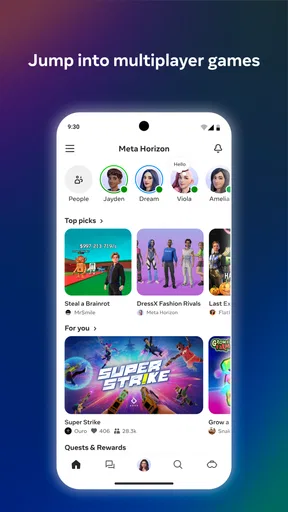
As soon as you launch Meta Horizon, you're greeted with a mesmerizing interface. It feels like stepping into a futuristic realm where the boundaries of reality and imagination blur. The app is designed for both Android and iOS, making it widely accessible. The interface is intuitive, so even if you're not a tech wizard, you’ll find your way around pretty easily.
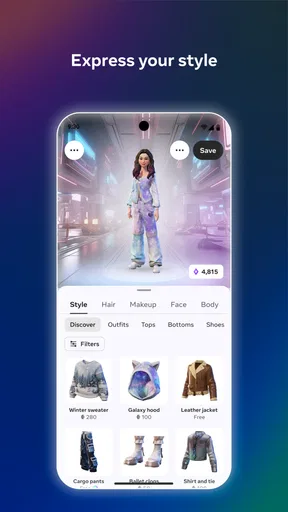
Once inside, you can create your own avatar. This feature is super detailed, allowing you to tweak everything from your hairstyle to your wardrobe. It’s like playing dress-up but in a virtual universe! I found myself spending way more time on this than I initially planned. If you enjoy customizing, this is your playground.
Exploring the Horizon
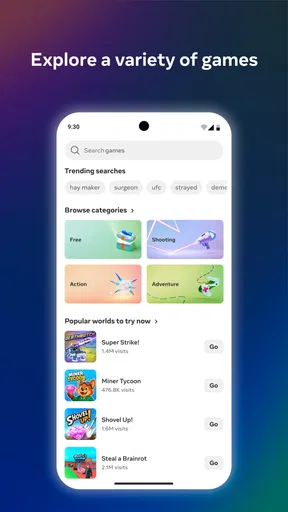
Now, let’s get into the meat of the app—exploration. The worlds in Meta Horizon are vast and varied. Whether you're into serene landscapes or bustling urban environments, there's something for everyone. I particularly loved how you can interact with different environments and meet fellow adventurers along the way. The social aspect is quite compelling. You can join communities, attend virtual events, and even host your own meet-ups.
Navigation is smooth for the most part, but there were a few times I noticed minor lags, especially in areas with a high number of users. However, the developers seem to be actively working on updates to enhance performance. So, fingers crossed for future improvements!
Settings that shape the visit
Before settling into a longer session, I would take a moment to check the controls and comfort options available on the device and in the experience. The best setup depends on whether I am using a phone or another supported way to access the platform, and on how I prefer to move around. I would not assume that every world handles movement or interaction in exactly the same way; a brief check when entering somewhere new can save a frustrating start.
I also recommend being deliberate about social participation. A public event can be lively, but that same crowd may make it harder to focus or navigate. If I am meeting friends, agreeing on a specific activity beforehand gives the visit some shape. If I am exploring alone, I can pick a quieter-feeling destination and leave whenever the space stops being enjoyable. Those small choices matter more here than they would in a game where the main task is simply to finish a level.
For families, the Teen content rating is a useful starting point, not a substitute for a conversation about online interaction. I would explain that other participants are real people and encourage younger users to pause or leave if an interaction feels uncomfortable. Adults who want a private, predictable experience may likewise prefer a single-player game; this platform’s social nature is part of its appeal, but it is not a benefit for everyone.
Features and Interactions
One of the standout features of Meta Horizon is the variety of activities you can indulge in. From virtual concerts to art galleries, the app has a rich palette of experiences. I attended a virtual music festival, and the experience was surprisingly immersive. The sound quality was crisp, and the visuals were vibrant.
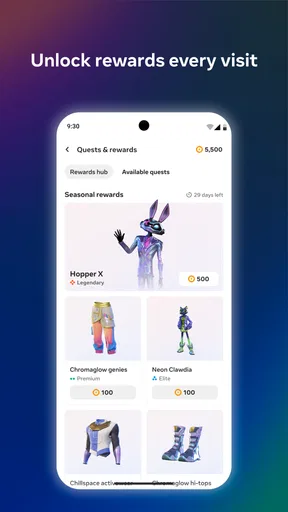
Another cool feature is the marketplace. Here, you can trade virtual goods or purchase items to enhance your avatar or virtual home. It adds a layer of depth to the app, making it feel like an entire ecosystem rather than just a game.
Spend with a clear purpose
The marketplace changes how I would approach the app: browsing can be enjoyable, but buying is optional, and I would decide what I actually want before spending. In-app purchases range from a few cents to just under one hundred dollars per item, so it is sensible to review the price of each item rather than assume everything is a small add-on. Since the game is free to download, I would try its basic social and exploration experience first and only consider purchases if they add something I will genuinely use.
For anyone sharing a device or payment method, purchase controls are worth checking before handing it over. That is a practical safeguard, especially when younger users are involved. Virtual goods can make an avatar or home feel more personal, but they do not necessarily make a visit more fun; I would treat them as optional decoration, not an entry fee.
Where the format can get in the way
The biggest trade-off is that a world shaped by other users can feel unpredictable. A busy place may be more sociable, yet it can also bring the minor lag I noticed and make movement or conversation less comfortable. On the other hand, a quieter visit may be easier to manage but less lively. I would not judge the whole platform by one crowded session; trying a different experience at another time is a reasonable test before deciding it is not for me.
There is also a difference between having many things to browse and having a strong reason to return. People who like spontaneous discovery may see the open-ended structure as freedom. Players who want carefully balanced challenges, a tightly written plot, or offline play may find it lacks the focus they want. Compared with a standard mobile adventure, it puts more weight on presence and social choice than on progression through a fixed set of missions.
Meta Horizon is free, developed by Meta Platforms Inc, and has a Teen age rating. It was released on May 1, 2018, and its current version is 349.2.0.46.104, with Android 8.0 as the minimum operating system. It has an average rating of 4.5 from around 109,000 ratings, alongside roughly 19,000 written reviews, and has passed 10 million installs. Those figures suggest a substantial audience, but they do not guarantee that every community or activity will suit an individual user.
Final Thoughts
Overall, Meta Horizon is a fascinating dive into the virtual world. It offers a unique blend of social interaction, exploration, and customization. While there are a few kinks to iron out, the potential is immense. If you're a fan of virtual reality or just looking for a new way to connect with people from around the globe, this app is definitely worth checking out.
I would recommend it most to curious players who like decorating an avatar, browsing varied environments, and having the option to share an experience with other people. I would skip it if I mainly wanted a concise story, reliable solo progression, or a calm game that asks little of my attention. For a realistic everyday use, imagine finishing your plans for the day and spending a little time visiting a virtual event with a friend; that is a more natural fit than opening it with no idea what you want from the session.
So, are you ready to unlock the door to your new virtual adventure? Download it now and see where your imagination takes you!
Privacy and Permissions
See what permissions an app requests and how it handles your data.
- Identity
- find accounts on the device
- Calendar
- read calendar events plus confidential information, add or modify calendar events and send email to guests without owners' knowledge
- Contacts
- find accounts on the device
- Location
- approximate location (network-based), precise location (GPS and network-based)
- Photos/Media/Files
- read the contents of your USB storage, modify or delete the contents of your USB storage
- Storage
- read the contents of your USB storage, modify or delete the contents of your USB storage
- Camera
- take pictures and videos
- Microphone
- record audio
- Wi-Fi connection information
- view Wi-Fi connections
- Other
- view network connections, create accounts and set passwords, pair with Bluetooth devices, access Bluetooth settings, full network access, change your audio settings, read sync settings, run at startup, control vibration, prevent device from sleeping, toggle sync on and off
Verdict
Strengths of Meta Horizon
- Immersive VR experiences with diverse environments.
- User-friendly interface for easy navigation.
- Regular updates with new features and content.
- Strong community support for multiplayer experiences.
- Cross-platform compatibility enhances accessibility.
Limitations of Meta Horizon
- Requires high-end hardware for optimal performance.
- Limited offline functionality for solo play.
- Occasional connectivity issues in multiplayer mode.
- Some experiences require additional purchases.
- Privacy concerns with data collection and sharing.
Similar Picks in This Category
View All
Roblox
Roblox Corporation4.2

Pokémon GO
Niantic, Inc.3.5

Ninja warrior: legend of adven
TOH Games4.6

Ninja Arashi
Black Panther4.6

Eyes - The Horror Game
Fearless Games sp. j.4.5

Critical Action:Gun Strike Ops
FPS Shooter & Action Game4.3
Frequently Asked Questions
What is Meta Horizon, and what can I do with it?
Meta Horizon is a virtual reality platform that allows users to explore and create immersive worlds. You can socialize with friends, attend virtual events, and participate in interactive experiences. The platform supports creativity and collaboration, offering tools to build your own virtual spaces and games.
Is Meta Horizon available on both Android and iOS devices?
Meta Horizon is primarily designed for VR headsets and may not be directly available on standard Android and iOS devices. However, you might find companion apps or features that integrate with your mobile device to enhance the VR experience. Always check the official website for compatible devices.
Do I need any special equipment to use Meta Horizon?
Yes, to fully experience Meta Horizon, a VR headset is required. Meta's own Oculus Quest is one of the recommended devices. This equipment provides the necessary hardware to navigate and interact within the virtual environments effectively, ensuring a smooth and immersive experience.
Is there a cost associated with using Meta Horizon?
Meta Horizon itself is free to download and explore. However, some premium features, in-app purchases, or exclusive content may require payment. Additionally, acquiring a compatible VR headset involves an initial investment. Always review any potential costs before committing to downloads or purchases.
How safe is Meta Horizon for users, particularly children?
Meta Horizon has safety measures in place, including privacy settings and community guidelines. However, parental supervision is recommended for younger users to ensure they have a positive and safe experience. It's important to familiarize yourself with the platform’s safety features and report any inappropriate behavior encountered.
Play our best games!


